Objects: Hidden Object Puzzle
Reviews
💡Objects offers a polished hidden object experience with its detailed, hand-drawn scenes and smooth performance. The game is easy to pick up, with intuitive mouse and touch controls. The highscore system adds replay value, encouraging players to improve their speed. It is an excellent choice for puzzle fans looking for a calming yet engaging activity.
Description
Game Introduction
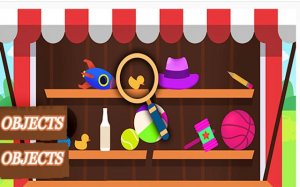
Objects is a hidden object puzzle game that challenges players to locate specific items within richly detailed environments. The game presents a single scene at a time, filled with artwork and everyday objects. Your goal is to find every item listed on the bench in the bottom left corner. Each object is placed with care, blending into the scene to test your observation skills. The game offers a relaxing yet engaging experience, suitable for quick breaks or longer play sessions. With its premium graphics and smooth performance, Objects provides a polished puzzle experience directly in your web browser.
How to Play
Use your mouse or touchscreen to control a magnifying glass. Click and drag or tap and move to scan the scene. Look at the object silhouettes on the left bench for your targets. When you find a matching item, tap or click on it. The game confirms your find and marks it off the list. Complete the list as fast as possible to earn a high score. The game saves your best times, encouraging you to improve with each play. The controls are simple, making it easy to start, but the puzzles require careful attention to master.
Game Features
Premium graphics with detailed, hand-drawn scenes. Responsive design that works on desktop and mobile devices. Touch and mouse support for flexible control. A built-in highscore system to track your best times. Modifiable source code for advanced users. Clean interface with no distractions, letting you focus on the search.
Tips for Success
Take your time scanning each area methodically. Look for shapes and colors that match the silhouettes. Use the magnifying glass to zoom in on cluttered spots. Practice regularly to improve your speed and pattern recognition. If you get stuck, step away briefly and return with fresh eyes. Focus on one object at a time to avoid missing subtle details.
Compatibility
Faq
Is Objects free to play?
Can I play Objects on my phone?
How many scenes are in Objects?
Does Objects have a timer?
Can I play Objects offline?
Are there hints available in Objects?
More Games
Twirl and Navigate Puzzle Game

Raindrop Garden Puzzle

Musical Bubble Pop Puzzle

Baby Hazel Sibling Fun - Kids Care Game
Candy Match 3 Puzzle

Audrey's Style Studio Hair Salon

Christmas Puzzle Gift Collection
Animal Matching Puzzle Adventure
Unicorn Brick Puzzle
Animal Sound Puzzles for Children
Kitten Care and Nurturing Game
Kids Alphabet Word Learning

Color Block Puzzle
Twisted Roads Driving Challenge
Holiday Freecell Solitaire Puzzle

Christmas Challenge Puzzle Game

Bumbling Bum Silly Arcade Puzzle

BMW X6 Jigsaw Puzzle

RS7 Sportback Jigsaw Puzzle
Smiling Glass Water Puzzle

Boom Dragon Puzzle Adventure

Word Scramble Family Puzzle
Holiday Bubble Shooter Puzzle
Cool Tetris Puzzle Game
Ocean Pals Match Puzzle
Block Puzzle Item Rush Puzzle Game

Truck Parking Puzzle Game

Cube World Logic Puzzle Adventure

Cat Search: Hidden Object Game

Butterfly Jigsaw Puzzle

Santa Gift Chase Holiday Run

Mystic Island Puzzle Quest
Tidy Up Hidden Object Puzzle

Cactus Island Puzzle Adventure

Cosmic Birds Puzzle Journey

Nation Balls Puzzle Journey
Ant Maze Adventure Puzzle
MechLoop: Puzzle Platformer Adventure
Pooh Jigsaw Puzzle Fun

Memory Cup Puzzle Challenge

Festive Slide Puzzle Game

Ball Speed Control Puzzle

TapTap Puzzle: Physics Challenge Game
Dot Tap Precision Puzzle

Hex Grid Puzzle Challenge
Boathouse Puzzle Escape
Pattern Sequence Puzzle Game