Slime Craft Studio - Creative Fun
Reviews
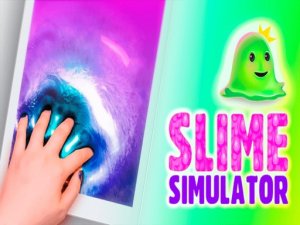
💡Slime Craft Studio offers a soothing escape into the world of slime making. The intuitive controls and wide variety of bases, colors, and decorations allow for endless creativity. It is a safe, family-friendly game that encourages experimentation without pressure. The ability to save and share creations adds to the fun. A great choice for anyone seeking a peaceful, creative pastime.
Description
Game Introduction
Slime Craft Studio - Creative Fun invites players into a relaxing world of slime crafting and customization. This game focuses on creativity and sensory satisfaction, allowing you to mix bases, colors, and decorations to create unique slime creations. There are no strict goals or time limits, making it a stress-free experience for both beginners and experienced slime enthusiasts. The game provides a safe, non-violent environment where the joy of making something unique is the main reward.
How to Play
To play, start by selecting a slime base with a specific texture from the available options. Next, choose colors from a rich palette and blend them to create custom shades. Add decorations such as charms, glitter, or beads to personalize your slime. The controls are intuitive and responsive, allowing you to stretch, poke, and shape your slime freely. Experiment with different combinations to discover new visual and tactile effects. Share your finished slime with friends or simply enjoy the calming process of creation.
Game Features
Features include a large variety of slime types and colors to choose from, easy touch or click controls, and a safe environment suitable for children and adults. The game encourages creativity without violence or inappropriate content. All content is family-friendly and adheres to high safety standards. The intuitive interface makes it easy for anyone to start creating immediately.
Tips for Success
To get the most out of your slime-making experience, try experimenting with different combinations of bases and colors to discover unique textures and appearances. Don't be afraid to mix various decorations to see how they interact. Take your time and enjoy the process without rushing. Sharing your creations with friends can inspire new ideas and add to the fun. Regular practice will help you master the controls and create more complex designs.
Compatibility
Faq
Can I save my slime creations in Slime Craft Studio?
Is Slime Craft Studio available on mobile devices?
Are there any in-app purchases in Slime Craft Studio?
Can I play Slime Craft Studio offline?
What age group is Slime Craft Studio suitable for?
Does Slime Craft Studio have a multiplayer mode?
More Games

Holiday Sudoku Logic Puzzle

Nation Balls Puzzle Journey

Tyne Train Tunnel Adventure Game
Blocky Squirrel Runner
Balance Ball 3D Adventure

Popcorn Chef Farm to Factory

Sky Ring Flyer Arcade
MechLoop: Puzzle Platformer Adventure

Ball Speed Control Puzzle

Dot Tap Precision Puzzle

ColorFlow Puzzle Art Game

Big Jump Reflex Puzzle

Bumbling Bum Silly Arcade Puzzle
Twisted Roads Driving Challenge

Unicorn Brick Puzzle

Musical Bubble Pop Puzzle

Raindrop Garden Puzzle

Fish Match 3 Puzzle

Dog Lovers Jigsaw Puzzle

Dora Coloring Adventure

Slice Dash: Endless Arcade Fun

Sky Sphere 3D Arcade Challenge

Alphabet Merge Puzzle

Pulse Ball Puzzle Arcade

Garden Guardians: Idle Tower Defense

Tile Breaker Arcade Game

Color Match Arcade Puzzle

Escape Room Puzzle Adventure
Cafe Waitress Time Management Game

Wildlife Vet Care Arcade

Block Clear Puzzle Challenges

Color Stack Tower Puzzle

Food Stand Spot the Difference

Sisters Day Celebration Dress Up

Number Sliding Puzzle

Line Draw 3D Puzzle Arcade

Meme Merge Puzzle Online
Princess Style Dress Up Game

Pizza Chef Kids Cooking Game

Princess Fitness Dress Up Game
Fashion Makeover Dress Up Game

Lily's St. Patrick's Day Dress Up

Poolside Fashion Dress Up Game
Summer Nail Art Dress Up

Princess Vacation Dress Up

Seasonal Style Dress Up

Fruit Match Spinner